

Securing Your CORS (Cross-Origin Resource Sharing) Regex
Securing Your CORS (Cross-Origin Resource Sharing) Regex

This write-up is inspired by findings on a penetration test on a client website. The Origin header had been checked to see if it could be replaced with domains under our control, some were blocked by the WAF and others were simply rejected as invalid by the server. Then I replaced a dot with an “a”…
Cross-Origin Resource Sharing (CORS) is the basis by which restricted resources on a web server can be requested from a domain outside of the source domain. It provides a middle ground between only allowing same-origin requests and allowing requests from any origin.
The “Origin” HTTP request header and the “Access-Control-Allow-Origin” response header are the most common headers related to the CORS policy.
As an example, the browser wants to access a resource on http://banking.site.com as part of a user browsing http://third.party.com
The options are:
- http://banking.site.com allows access from any origin, in which case the header “Access-Control-Allow-Origin: *” is returned, with * being a wildcard showing that any origin can access resources;
- http://banking.site.com does not allow access from http://third.party.com and an error is returned; or
- http://banking.site.com explicitly allows access from http://third.party.com (and potentially others, but not all) and returns the header “Access-Control-Allow-Origin: http://third.party.com”
This last option is what we are interested in.
Usually, this part of the CORS configuration will be done with a regular expression (regex), for example:
http://[ a-zA-Z0-9]+.party.com
This regex would allow for our http://third.party.com and any other subdomain of PARTY.COM as intended, because it requires “http://” at the beginning, then any combination of numbers and letters, then “.party.com”.
Right?
Not quite.
In a regex, a dot is interpreted as a wildcard, so if we request a resource at http://banking.site.com from http://third.party.com then it will work and we will think our regex is functioning properly. However, we can also request resources from the origin domain http://thirdAparty.com, or http://thirdBparty.com and so on. We have our choice of 36 domains to choose from (26 letters and 10 numbers). It may also be technically possible to register a domain ending partyAcom, partyBcom etc though creating a new top-level domain like this is more complex.
An attacker could register one of these domains and start making attacks against the server. If the “Access-Control-Allow-Credentials: true” HTTP response header is set then the attacker could social engineer a victim to visit their website and, using some malicious embedded JavaScript, send a request to the legitimate site using their credentials.
The correct regex to use would be:
http://[ a-zA-Z0-9]+.party.com
Note: the backslash before the dot preceding party and com. Backslashes are escaped characters in regular expressions. This would prevent the above-mentioned slightly sneaky CORS misconfiguration and subsequent exploitation.
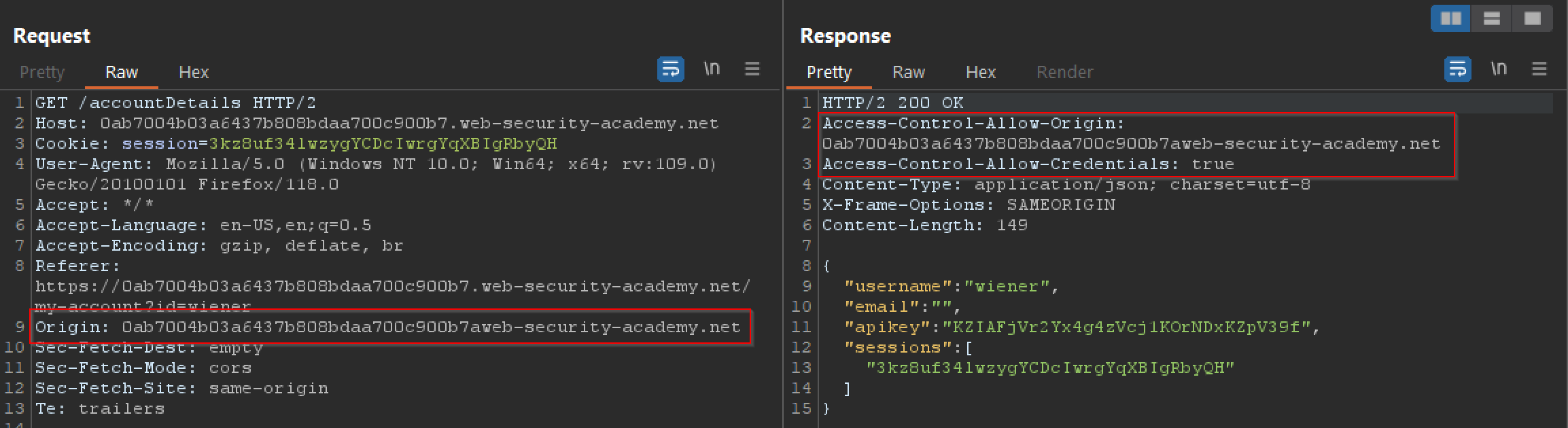
This screenshot demonstrates the above vulnerability. By replacing the dot between the subdomain and main domain in the URL with another character (in this case, “a”), due to the aforementioned misconfiguration on the origin regex and passing of credentials being enabled, the account details including sessionID can be seen in the response even though the request has not come from within the original domain.
